

Overview
The Exchange operates as a continuous central limit order book to match orders within the system according to price-time priority:- Higher-priced orders to buy have priority over lower-priced bids,
- Lower-priced offers to sell buy have priority over higher-priced sells,
- Within a price level, older orders have priority over newer orders,
- Should an existing order increase its quantity (at the same price), it is assigned a new timestamp and therefore loses time priority, but quantity decreases retain time priority.
Self-Match Prevention
The Polymarket US offers self-match prevention logic which can be enabled either at the FIX session level (automatically applied to all orders entered through a session), or on a per-order basis using the SelfMatchPreventionID (7928) and SelfMatchPreventionInstruction (8000) tags. This instruction will automatically cancel one or both orders (without execution) which would potentially be involved in a self-match. The options are:- The aggressor (new) order will be canceled.
- The passive (existing) order is canceled.
Tick Sizes / Minimum Quantity Increments
Each instrument on the Polymarket US has a minimum price increment (“tick size”) and minimum quantity increment (“lot size”). These instrument-level settings are indicated in the SecurityList [y] message in the MinPriceIncrement (969) and MinTradeVol (562) fields respectively. Order with a price and/or quantity which do not comply with these increments will be rejected using BusinessMessageReject [j] with reason 13 = Incorrect quantity or 18 = Invalid price increment (tick size).Order Types, Time In Force & Execution Instructions
The intended behavior of orders entering the Polymarket US is controlled using a combination of OrderType (40), TimeInForce (59) and ExecInst (18) fields. These are explained in turn below.Table 12: OrdType (40) definitions
| Order Type | Value | Definition |
|---|---|---|
| LIMIT | 2 | A priced order that can only trade at a price equal to or better than the price specified. |
| MARKET TO LIMIT | K | An order that fills as far as possible at the best price(s) in the market. Should the order volume exceed that available in the order book, then the remaining order quantity is converted into a Limit order with the price equal to the last fill price (subject to Time In Force instructions).<br>In the case where there is no market, the order will be rejected with reason “No liquidity for market order”. |
| STOP | 3 | An order which initially enters the system as hidden, but which activates (converts to active) once the price indicated by StopPx (99) is triggered in the market. At this point the order is converted into a Market to Limit order with the indicated quantity. |
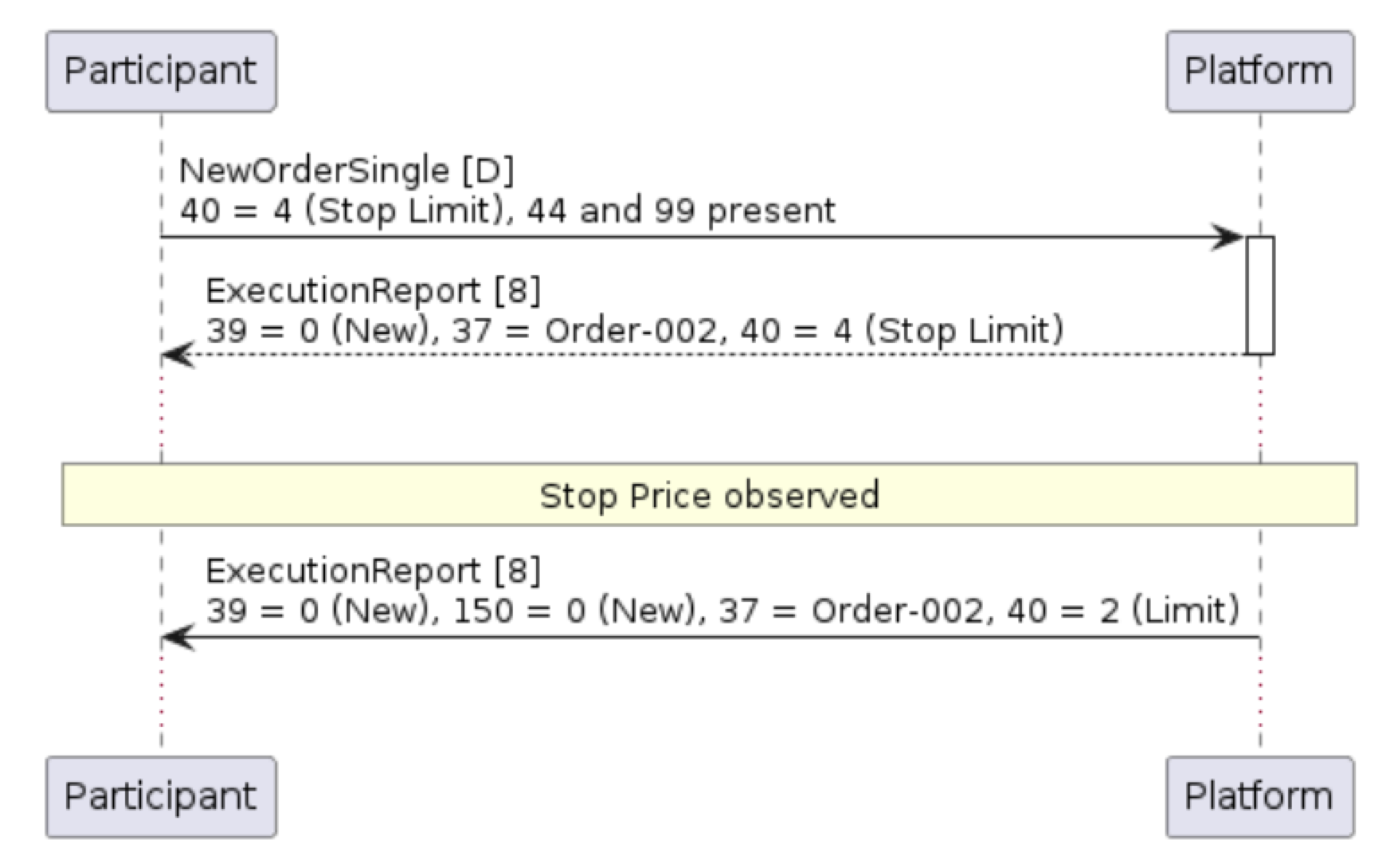
| STOP LIMIT | 4 | An order similar to STOP, but where the converted order is a Limit order with the indicated Price (44). |
Table 13: TimeInForce (59) conditions
| Time In Force | Value | Definition |
|---|---|---|
| DAY | 0 | The order remains open for the current trading day only. |
| GOOD TILL CANCEL (GTC) | 1 | The order remains available for execution until fully executed or canceled. |
| IMMEDIATE OR CANCEL (IOC) | 3 | The order is immediately executed as far as possible upon entry, with all unfilled quantity expired. Can be used in conjunction with MinQty (110) to specify a minimum quantity which must be executed immediately. |
| FILL OR KILL (FOK) | 4 | If the entire order quantity can not be satisfied immediately, then the order is canceled in full. |
| GOOD TILL DATE (GTD) | 6 | The trade is active until a specific date and time (expressed in UTC) as indicated in ExpireTime (126). |
- An order marked as IOC with MinQty (110) of 200 must receive an immediate, minimum trade quantity of 200. If this is not possible, then the entire order immediately expires.
- In the case of orders marked with a FOK TimeInForce (59), MinQty (110) can be included but has no material effect, as the FOK requires a full fill upon entry.
- A Good Till Cancel order with a MinQty (110) specified must trade at least the specified quantity upon first entry into the order book, otherwise the order expires.
Table 14: ExecInst (18) definitions
| Exec Instruction | Value | Definition |
|---|---|---|
| ALL OR NONE | G | Require that either (a) all of the order quantity is filled immediately, or (b) none of it should trade even partially. Marking an order with this ExecInst instruction is functionally-equivalent to setting Time In Force to FOK. |
| IGNORE PRICE VALIDITY CHECKS | c | Exempt this order from absolute price limits, relative price limits, order size limits, and total notional limits. Only allowed for market-to-limit orders to sell. This flag exists to support quickly liquidating a position. |
| PARTICIPATE DON’T INITIATE | 6 | Require that the order is only accepted if it would NOT immediately match. This guarantees that the order will always be the passive side in any trades. An order that would result in a match would be rejected with reason “Order may participate but not initiate in the market”. Should not be used in combination with MinQty (110) or conditions which require immediate executions - ExecInst (18) = G (All or None), or TimeInForce (59) = 3 or 4 (IOC or FOK). |
| SINGLE EXECUTION REQUESTED FOR BLOCK TRADE | j | A flag for submitting block trades to Polymarket US. |
| BEST LIMIT | R | A flag that if set indicates that the price of a limit order shall be set to the price at the top of the book on the same side as this order. |
| IMMEDIATELY EXECUTABLE LIMIT | T | A flag that if set indicates that the price of a limit order shall be set to the price at the top of the book on the opposing side as this order, thus able to immediately match. |
Order Entry
Participants may place orders into the Polymarket US order book to buy or sell securities using a NewOrderSingle [D] message.Table 15: NewOrderSingle (D) message
| Tag | Field Name | Req’d | Data Type | Comments |
|---|---|---|---|---|
| Standard Header | Y | 35 = D | ||
| 11 | ClOrdID | Y | String | Unique, participant-created identifier for this Order. Uniqueness must be guaranteed across a session (i.e. between logon and logout), which may span multiple days |
| 1 | Account | N | String | Account reference as previously advised to the exchange operator |
| 18 | ExecInst | N | MultipleChar | Instructions for order handling. Note that Price Validity Checks can only be ignored (c) for market-to-limit orders to sell.<br>G = All or None<br>c = Ignore Price Validity Checks<br>6 = Participate Don’t Initiate |
| 110 | MinQty | N | Qty | Minimum order quantity that must be executed upon entry (or else the whole order is immediately canceled). |
| 55 | Symbol | Y | String | Instrument symbol |
| 460 | Product | Y | Int | Indicates the type of product the security is associated with.<br>1=AGENCY<br>2=COMMODITY<br>3=CORPORATE<br>4=CURRENCY<br>5=EQUITY<br>6=GOVERNMENT<br>7=INDEX<br>8=LOAN<br>9=MONEYMARKET<br>10=MORTGAGE<br>11=MUNICIPAL<br>12=OTHER<br>13=FINANCING<br>14=ENERGY |
| 54 | Side | Y | char | 1 = Buy<br>2 = Sell |
| 60 | TransactTime | N | UTCTime | Timestamp of order entry in UTC. |
| 38 | OrderQty | Y | Qty | Order quantity. Can be a decimal. |
| 40 | OrdType | Y | Char | Order type.<br>2 = Limit<br>3 = Stop<br>4 = Stop limit<br>K = Market with left-over as limit |
| 44 | Price | N | Price | Price per share/unit. Required where OrdType (40) = 2 (Limit) or 4 (Stop Limit). |
| 99 | StopPx | N | Price | Stop price at which to trigger the stop order. Required for OrdType (40) = 3 (Stop) or 4 ( Stop Limit). Must be greater than or equal to Price (44) for buy order, or less than or equal to Price (44) for sell orders. |
| 581 | AccountType | N | Int | 1=CUSTOMER<br>2=NON_CUSTOMER<br>3=HOUSE_TRADER<br>4=FLOOR_TRADER<br>6=NON_CUSTOMER_CROSS_MARGINED<br>7=HOUSE_TRADER_CROSS_MARGINED<br>8=JOINT_BACK_OFFICE<br>9=EQUITIES_SPECIALIST<br>10=OPTIONS_MARKET_MAKER<br>11=OPTIONS_FIRM_ACCOUNT<br>12=AGGREGATED_CUSTOMER_AND_NON_CUSTOMER<br>13=AGGREGATED_MULTIPLE_CUSTOMERS<br>14=LIQUIDITY_PROVIDER<br>15=OPERATING<br>16=CLEARING_FUND<br>17=FUTURES_MARKET_MAKER |
| 582 | CustOrderCapacity | N | Int | 1=OWN_ACCOUNT<br>2=PROPRIETARY_ACCOUNT<br>3=FINANCIAL_ADVISOR<br>4=ALL_OTHER<br>5=RETAIL_CUSTOMER |
| 453 | NoPartyIDs | N | NumingGroup | Number of PartyID (448), PartyIDSource (447), and PartyRole (452) entries |
| —> 448 | PartyID | N | String | Party identifier/code |
| —> 447 | PartyIDSource | N | char | D=Proprietary |
| —> 452 | PartyRole | N | Int | 1=EXECUTING_FIRM<br>3=CLIENT_ID<br>24=CUSTOMER_ACCOUNT |
| 59 | TimeInForce | N | char | 0 = Good for day [Default]<br>1 = Good till cancel<br>3 = Immediate or cancel<br>4 = Fill or kill<br>6 = Good till date |
| 126 | ExpireTime | N | UTCTime | Order expiry date and time for orders where TimeInForce = Good Till Date |
| 1028 | ManualOrderIndicator | N | Boolean | Indicates if the order was initially received manually (as opposed to electronically) |
| 6127 | ConditionTriggerMethod | N | int | The reference price used to trigger the stop order. Applicable to Stop orders only.<br>2 = Last price [Default]<br>5 = Settlement price<br>Settlement price may be the preferred trigger method for markets where settlement price is updated frequently from a price oracle. |
| 7928 | SelfMatchPreventionID | N | String | Unique identifier to be returned in the case of a self-match prevention cancellation.<br>The same ID must be present on all orders where self-match prevention is desired. |
| 8000 | SelfMatchPreventionInstruction | C | String | Self-match instruction.<br>O = Cancel oldest (resting) order<br>N = Cancel newest (aggressive) order |
| Standard Trailer | Y |
Order Acknowledgement & Execution
The ExecutionReport [8] message is used to acknowledge various order lifecycle events including the acceptance, rejection, and expiry of orders, as well as providing details of matches (fills) against orders.
All orders entering the Platform are first either accepted or rejected using an Execution Report [8]. The order may then receive further Execution Reports [8] as necessary given their marketability and TimeInForce (59) constraints. For example:
- A badly-formatted order which fails validation upon entry will receive an ExecutionReport [8] with OrdStatus (39) = 8 (Rejected).
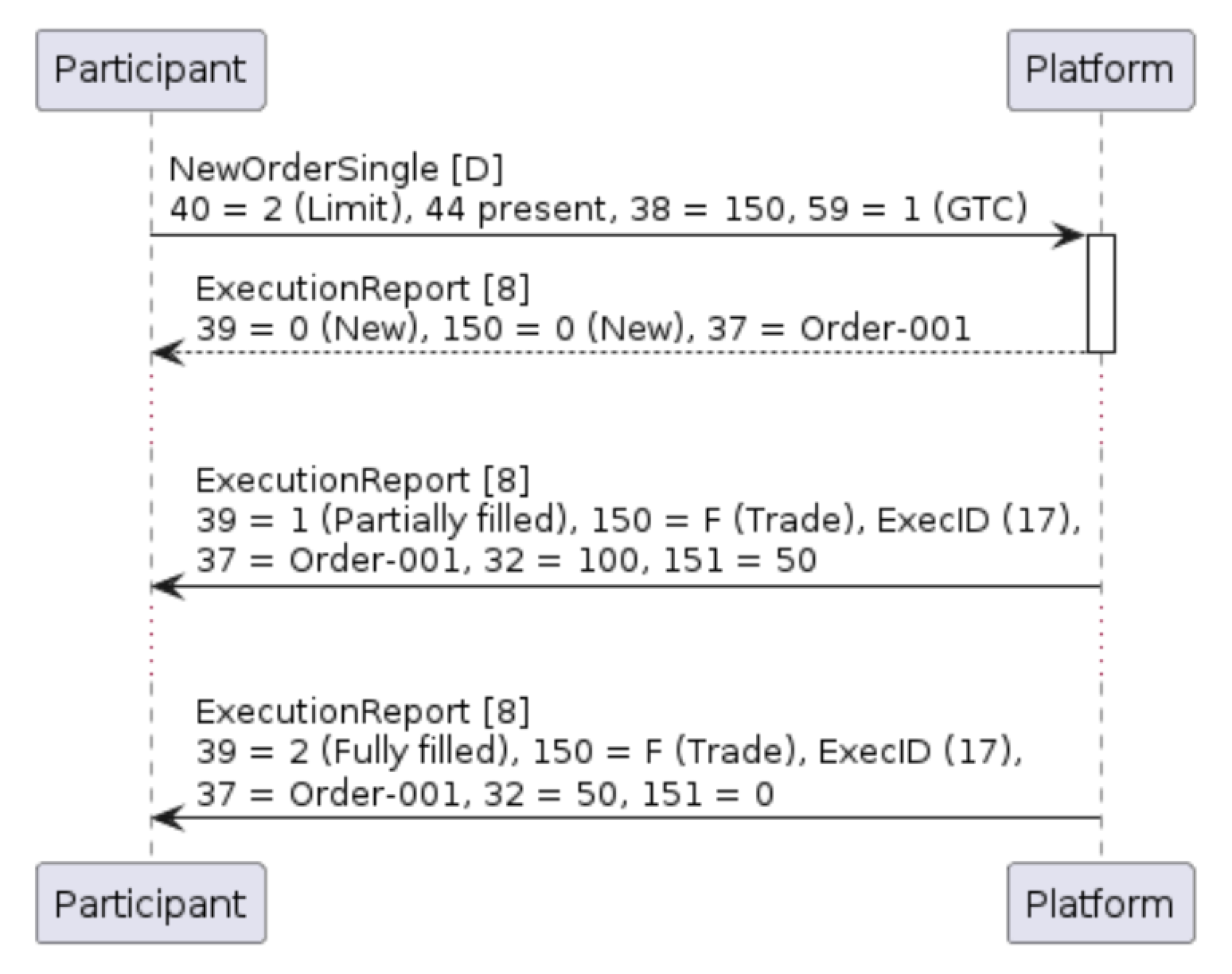
- A good for day order which is not immediately executable will receive an ExecutionReport [8] with OrdStatus (39) = 0 (New). Should it receive executions during the course of the day, then these will be notified in subsequent Execution Report [8] messages with OrdStatus (39) = 1 (Partially Filled) and/or 2 (Fully Filled).
- An order with TimeInForce (59) = 6 (good till time) will receive an ExecutionReport [8] with OrdStatus (39) = 0 (New) upon entry. If it remains unexecuted, it will expire at the indicated ExpireTime (126) with an Execution Report [8] message with OrdStatus (39) = C (Expired).
- A Fill Or Kill order with TimeInForce (59) = 4 which can not be fully executed will first receive an ExecutionReport [8] with OrdStatus (39) = 0 (New) and then an immediate Execution Report [8] message with OrdStatus (39) = C (Expired).
- An order with TimeInForce (59) = 3 (immediate or cancel) which can be partially filled upon entry will receive at least three ExecutionReport [8] messages; the first will indicate OrdStatus (39) = 0 (New), the next messages will detail the fill(s), and the final Execution Report [8] message will expire the remainder with OrdStatus (39) = C (Expired).
Table 16: ExecutionReport (8) message
| Tag | Field Name | Req’d | Data Type | Comments |
|---|---|---|---|---|
| Standard Header | Y | 35 = 8 | ||
| 1 | Account | N | String | Account reference if indicated on the original order |
| 6 | AvgPx | Y | Price | Volume-weighted average price of all trades against this order. May be zero for unexecuted orders. |
| 11 | ClOrdID | Y | String | The participant-assigned ClOrdID value as sent on the last order action message form the Participant (new order, amendment or cancel). |
| 14 | CumQty | Y | Qty | Cumulative quantity so far for this order. May be zero for unexecuted orders. |
| 17 | ExecID | Y | String | Unique identifier for the Execution Report as assigned by Polymarket US. Typically a 13-character alphanumeric string. |
| 22 | SecurityIDSource | Y | String | Identifies source of SecurityID (48) value.<br>8 = Exchange symbol |
| 31 | LastPx | Y | Price | Price of this last fill. Will be zero for messages not relating to a trade. |
| 32 | LastQty | Y | Qty | Quantity traded on this last fill. Will be zero for messages not relating to a trade. |
| 37 | OrderID | Y | String | Unique identifier for Order as assigned by Polymarket US. Typically a 13-character alphanumeric string. |
| 38 | OrderQty | Y | Qty | Total order quantity (amended as necessary) |
| 39 | OrdStatus | Y | char | The latest status of the order after any changes have been applied.<br>0 = New<br>1 = Partially filled<br>2 = Fully filled<br>4 = Canceled<br>8 = Rejected<br>C = Expired |
| 40 | OrdType | Y | char | The type of order.<br>2 = Limit<br>3 = Stop<br>4 = Stop Limit<br>K = Market with left over as limit |
| 41 | OrigClOrdID | N | String | Sent in the case of order amendment or cancellation. References the prior ClOrdID (11) value that the action amended/canceled. |
| 44 | Price | Y | Price | Order limit price (amended as necessary) |
| 48 | SecurityID | Y | String | Security identifier; will always match Symbol (55). |
| 54 | Side | Y | char | 1 = Buy<br>2 = Sell |
| 55 | Symbol | Y | String | Instrument symbol |
| 460 | Product | Y | Int | Indicates the type of product the security is associated with.<br>1=AGENCY<br>2=COMMODITY<br>3=CORPORATE<br>4=CURRENCY<br>5=EQUITY<br>6=GOVERNMENT<br>7=INDEX<br>8=LOAN<br>9=MONEYMARKET<br>10=MORTGAGE<br>11=MUNICIPAL<br>12=OTHER<br>13=FINANCING<br>14=ENERGY |
| 59 | TimeInForce | Y | char | Echoed from New Order Single<br>0 = Good for day<br>1 = Good till cancel<br>3 = Immediate or cancel<br>4 = Fill or kill<br>6 = Good till date |
| 60 | TransactTime | Y | UTCTime | Timestamp when the business transaction represented by the message occurred. |
| 99 | StopPx | Y | Price | Order stop price (amended as necessary). Will be zero for non stop orders. |
| 103 | OrdRejReason | N | int | Rejection reason (where OrdStatus = Rejected)<br>0 = Broker/Exchange Option<br>1 = Unknown symbol<br>2 = Exchange closed (maintenance)<br>3 = Order exceeds limit (price validation)<br>5 = Unknown order<br>6 = Duplicate order (ClOrdID)<br>11 = Unsupported order characteristic<br>12 = Surveillance option<br>13 = Incorrect quantity (lot size)<br>15 = Unknown account (tag 1)<br>16 = Price exceeds current price band<br>18 = Invalid price increment (tick size)<br>99 = Other |
| 119 | SettlCurrAmt | N | Amt | Present on trades only. Total amount of this last fill. Equal to LastPx (31) x LastQty (32) |
| 126 | ExpireTime | N | UTCTime | Order expiry date (amended as necessary). |
| 150 | ExecType | Y | char | The reason that the Polymarket US sent this Execution Report.<br>0 = New<br>4 = Canceled<br>5 = Replaced<br>8 = Rejected<br>C = Expired<br>F = Trade |
| 151 | LeavesQty | Y | Qty | Remaining, unexecuted quantity left on the order. May be zero for fully filled orders. |
| 381 | GrossTradeAmt | N | Amt | Present on orders which have been filled. Total amount traded across all fills for this order. Equal to AvgPx (6) x CumQty (38). |
| 581 | AccountType | N | Int | 1=CUSTOMER<br>2=NON_CUSTOMER<br>3=HOUSE_TRADER<br>4=FLOOR_TRADER<br>6=NON_CUSTOMER_CROSS_MARGINED<br>7=HOUSE_TRADER_CROSS_MARGINED<br>8=JOINT_BACK_OFFICE<br>9=EQUITIES_SPECIALIST<br>10=OPTIONS_MARKET_MAKER<br>11=OPTIONS_FIRM_ACCOUNT<br>12=AGGREGATED_CUSTOMER_AND_NON_CUSTOMER<br>13=AGGREGATED_MULTIPLE_CUSTOMERS<br>14=LIQUIDITY_PROVIDER<br>15=OPERATING<br>16=CLEARING_FUND<br>17=FUTURES_MARKET_MAKER |
| 582 | CustOrderCapacity | N | Int | 1=OWN_ACCOUNT<br>2=PROPRIETARY_ACCOUNT<br>3=FINANCIAL_ADVISOR<br>4=ALL_OTHER<br>5=RETAIL_CUSTOMER |
| 453 | NoPartyIDs | N | Int | Number of PartyID (448), PartyIDSource (447), and PartyRole (452) entries |
| —>448 | PartyID | N | Party identifier/code | |
| —>447 | PartyIDSource | N | D=Proprietary | |
| —>452 | PartyRole | N | 1=EXECUTING_FIRM<br>3=CLIENT_ID<br>24=CUSTOMER_ACCOUNT | |
| 828 | TrdType | N | int | Present on trades only.<br>0 = Regular trade |
| 880 | TrdMatchID | C | String | Always populated for trades. Note that buyer and seller will receive the same value. Will match the TradeID (1003) value on market data updates. Typically a 13-character alphanumeric string. |
| 1028 | ManualOrderIndicator | N | Boolean | Indicates if the order was initially received manually (as opposed to electronically) |
| 1057 | AggressorIndicator | C | Boolean | Always populated for trades. Identifies whether this order was the aggressor in the trade. |
| 378 | ExecRestatementReason | N | int | Indicates that the resting order has been canceled as a result of self-match prevention.<br>99 = Self-match prevention |
| 110 | MinQty | N | Qty | Minimum required execution quantity for the order (if specified) |
| 6127 | ConditionTriggerMethod | N | int | The reference price used for triggering the stop order.<br>2 = Last price<br>5 = Settlement price |
| 7928 | SelfMatchPreventionID | N | String | Unique identifier for the self-match prevention instruction. |
| 8000 | SelfMatchPreventionInstruction | N | String | Self-match instruction.<br>O = Cancel oldest (resting) order<br>N = Cancel newest (aggressive) order |
| Standard Trailer | Y |
Figure 5: Simple limit order for 150 is acknowledged, partially filled for 100, and fully filled
Example 6: Acknowledgement of new limit order to buy 1,000 shares at 50.00
Triggering Stop Orders
Stop Orders which have been accepted by the Platform are immediately acknowledged with an ExecutionReport [8] message indicating OrdStatus (39) = 0 (New). They remain outside the central limit order book until the StopPx (99) has been observed, triggering the release of either a Limit or Market-to-Limit order into the order book. At this point, the Platform will send a second, unsolicited Execution Report [8] with a matching OrderID (37) value, and the OrdType (40) of either 2 (Limit) or K (market-to-limit). The OrdStatus (39) of this triggered order will be 0 (New).Figure 6: Triggering of Stop Limit order
Example 9: Entry of a Stop Limit order
Market-To-Limit Order Behavior
Market-to-limit orders (OrderType (39) = K) are unpriced orders which are designed to execute against any existing orders in the order book upon arrival, with any remaining order balance automatically converted into a Limit order at the last trade or “worst fill” price. To illustrate this behavior, consider the below order book: When a new Market-to-Limit order selling 1,800 hits the order book, then the order will immediately trade 1,000 shares at 10.03, and a further 500 shares at 10.02. Since there are no further bids, the Platform will place the remaining 300 shares into the order book at a price equal to the last fill price of 10.02.

Figure 7: Handling of Market-to-Limit order (see example)
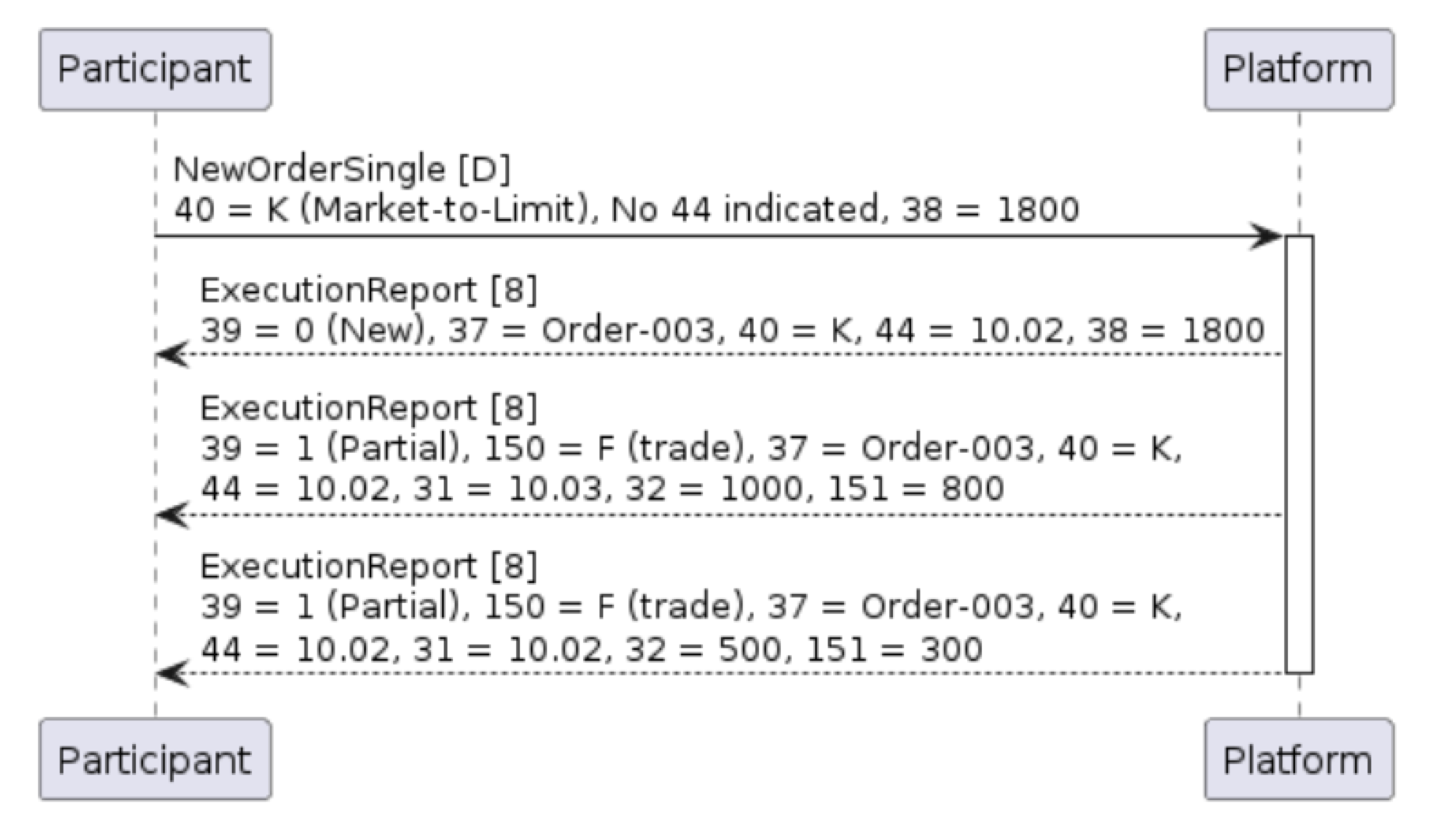
Note that unlike Stop Orders, Market-to-Limit orders retain the same OrdType (40) of K (Market-to-limit) throughout their life; the initial acknowledgement contains the limit Price (44) of the resting order.
Example 12: Initial acknowledgment of Market-to-Limit order indicating end Limit Price (44)
Self-Match Prevention
Orders may have self-match prevention enabled at either the FIX session level, or at an order-level basis using tags SelfMatchPreventionID (7928) and SelfMatchPreventionInstruction (8000). Where specified, two otherwise-executable orders from the same participant and which carry the same SelfMatchPreventionID (7928) will be prevented from matching by expiring one of the orders. Whether the resting or aggressive order is canceled is governed by SelfMatchPreventionInstruction (8000) of the incoming order.Figure 8: Self-match prevention expires the oldest order to prevent self-trading
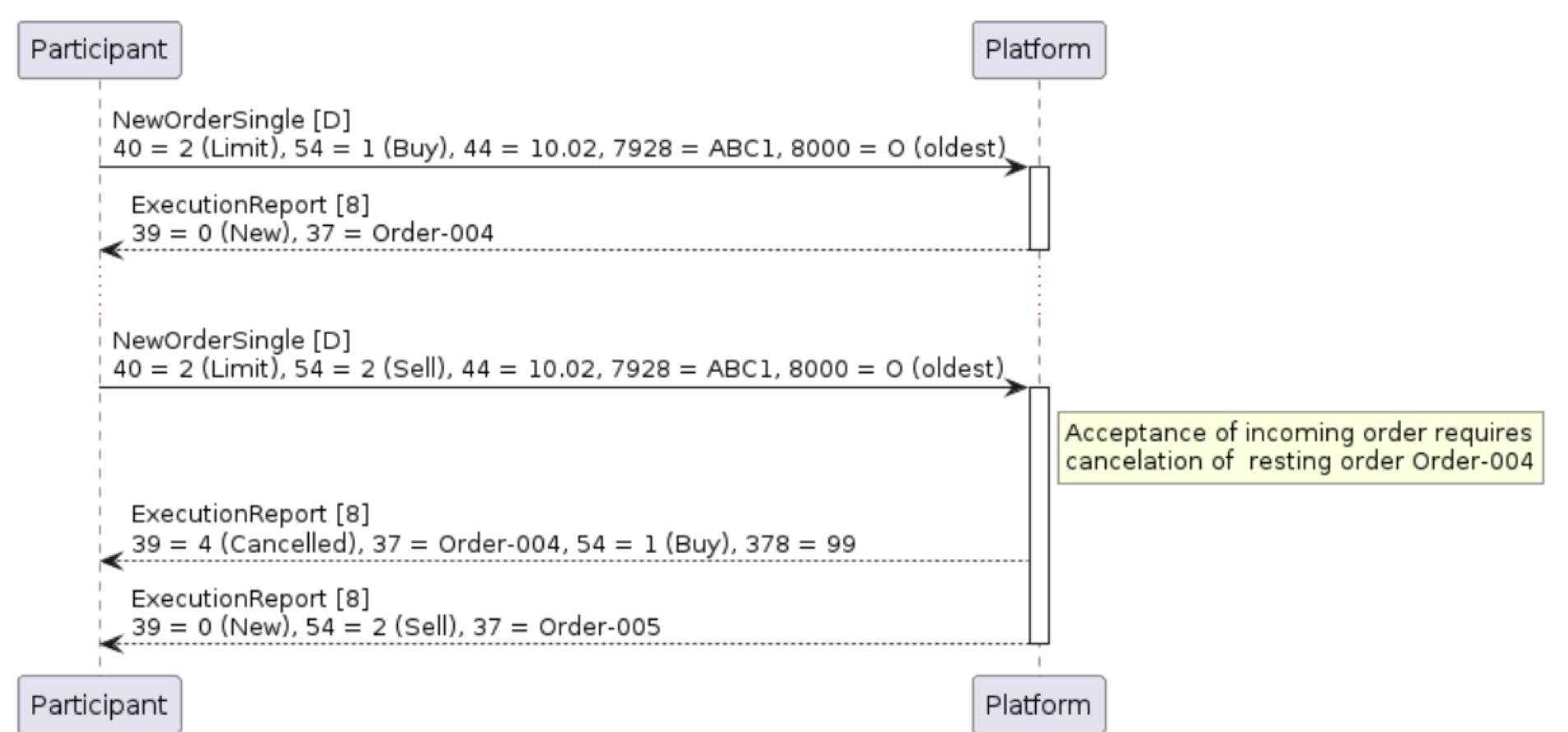
Note that resting order(s) will expire just after the incoming order has been accepted by the Platform, and before any trades have taken place. The incoming order is therefore permitted to trade against other orders in the order book as it entered the market. Example 13: ExecutionReport indicating resting order expiry as a result of self-match prevention
Figure 9: Self-match prevention causes newest order to be rejected
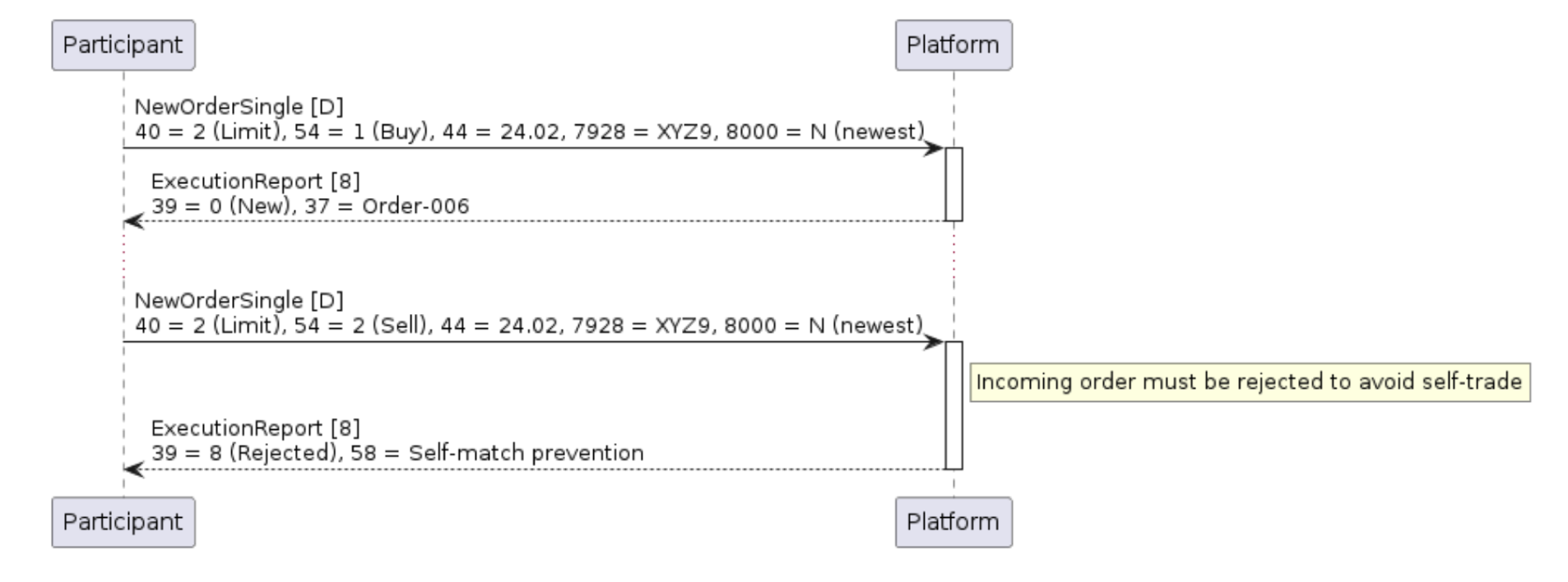
Example 14: ExecutionReport immediately rejecting incoming order as a result of self-match prevention
Order Modification
Participants may request to amend any open order using the OrderCancelReplaceRequest [G] message. In this case, the order to be amended is identified using the last-entered ClOrdID (11) value relating to the order into the OrigClOrdID (41) field. Following FIX convention, this modification message will also contain a fresh ClOrdID (11) value which can then be used by the Participant to further modify the order if required. Note that the Polymarket US does not require the entry of the (platform-generated) OrderID (37) in order to amend the order.
Table 17: OrderCancelReplaceRequest (G) message
If the order has been successfully modified, the Polymarket US will respond with an ExecutionReport [8] message which echoes many of the key (updated) order attributes, and with ExecType (150) = 5 (replaced). Note that a modification which increases the remaining order quantity will lose its time priority at a price level. Any modifications to reduce order quantity (or other non-price modifications which do not change quantity) will not cause the order to lose their order book priority.Figure 10: Successful amend of existing order to adjust OrderQty [38]
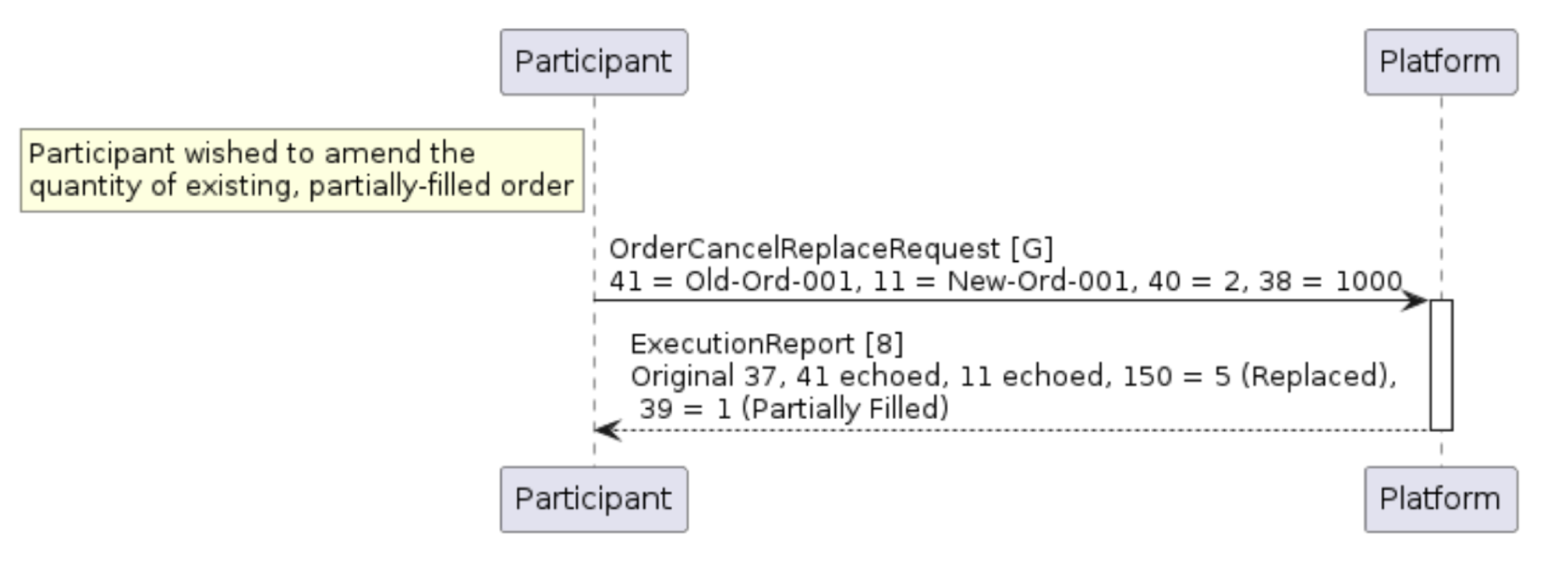
Example 15: Request to replace an existing order
Figure 11: Unsuccessful amend of existing order to adjust OrderQty [38]
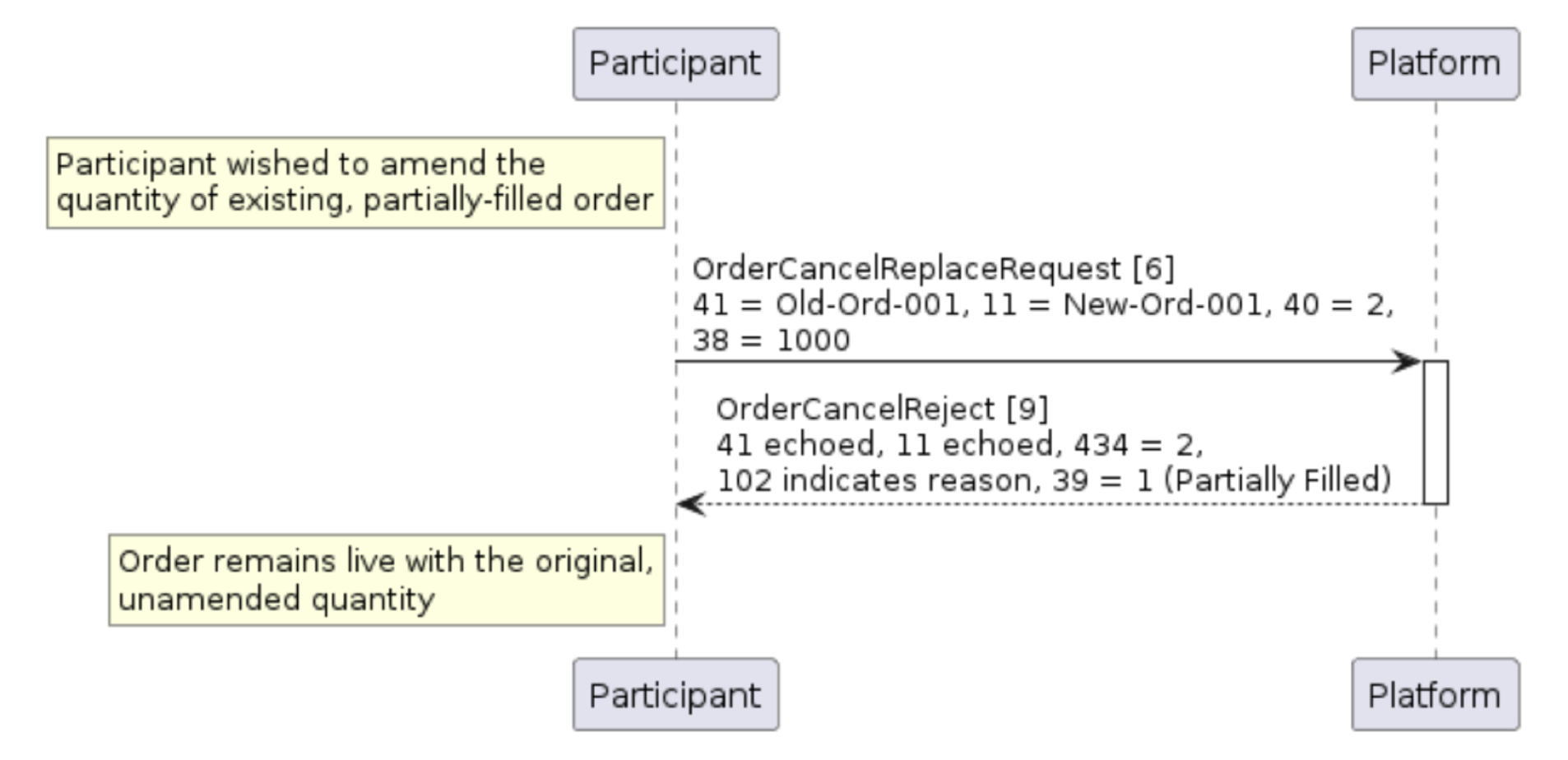
Order Cancellation
Participants may request to cancel any open order using the OrderCancelRequest [F] message. As with order amend requests, the order to be canceled is identified using the last-entered ClOrdID (11) value relating to the order into the OrigClOrdID (41) field. If the order has been canceled, the Polymarket US will respond with an ExecutionReport [8] message which echoes many of the key (updated) order attributes, and with ExecType (150) = 4 (canceled).Table 18: OrderCancelRequest (F) message
| Tag | Field Name | Req’d | Data Type | Comments |
|---|---|---|---|---|
| Standard Header | Y | 35 = F | ||
| 11 | ClOrdID | Y | String | Fresh, participant-generated, unique reference for this OrderCancelRequest. Must be different from the original ClOrdID (11) for the order. |
| 41 | OrigClOrdID | Y | String | The last (participant-generated) ClOrdID (11) reference for the order. This might be from the original NewOrderSingle or prior amends. |
| 55 | Symbol | Y | String | Instrument symbol as indicated on the order. |
| Standard Trailer | Y |
If the request to cancel the order passed validation, then the Polymarket US will acknowledge the order cancellation with an ExecutionReport [8] message indicating OrdStatus (39) = 4 (canceled), and LeavesQty (151) = 0.
Figure 12: Successful cancelation of existing order
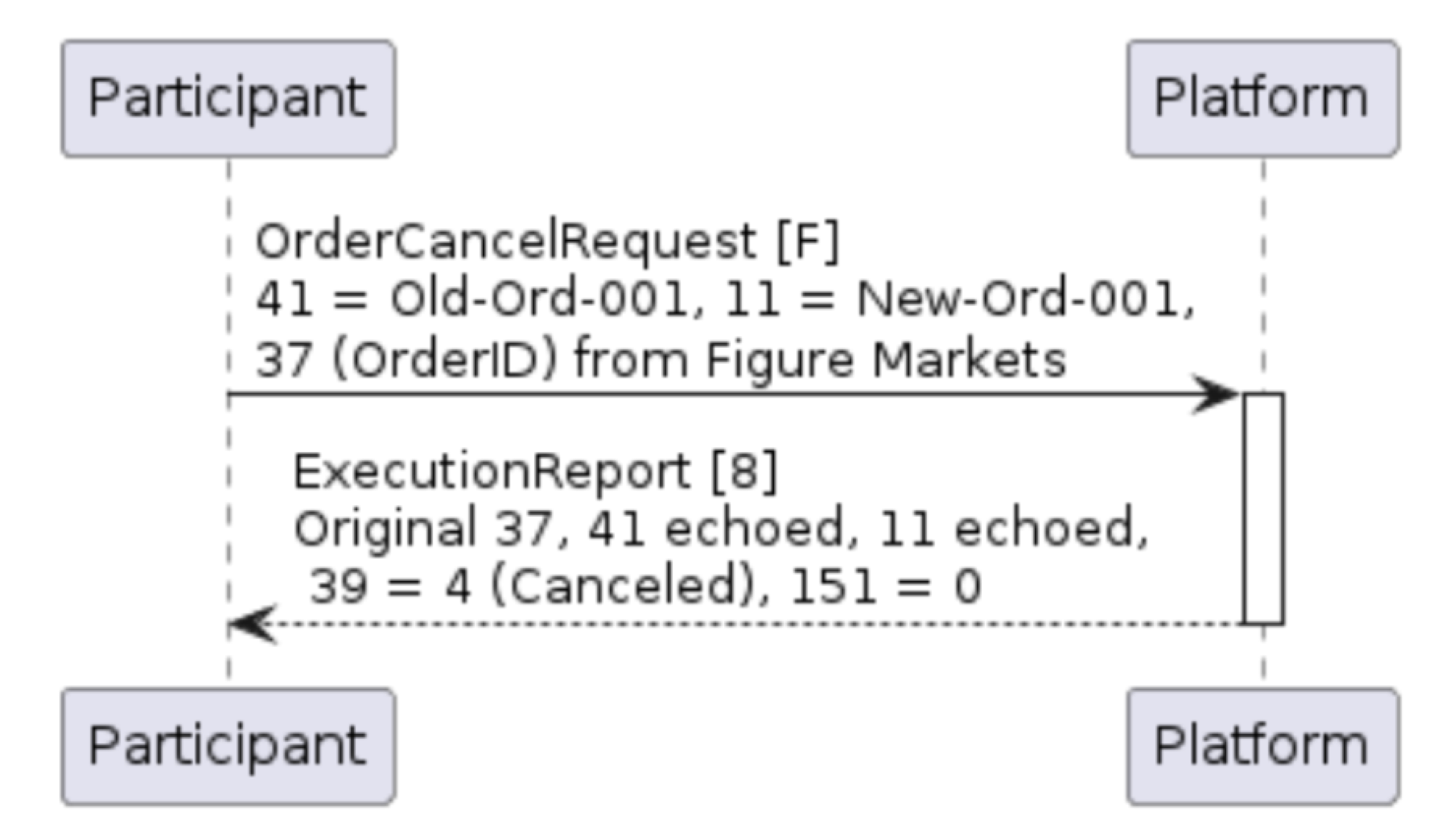 Example 16: Example of order cancel message
Table 19: OrderCancelReject (9) message
| Tag | Field Name | Req’d | Data Type | Comments |
|---|---|---|---|---|
| Standard Header | Y | 35 = 9 | ||
| 11 | ClOrdID | Y | String | Echoed from the OrderCancelRequest |
| 37 | OrderID | Y | String | Will be ‘NONE’ for unknown orders |
| 39 | OrdStatus | Y | char | Status of the cancellation request.<br>8 = Rejected |
| 41 | OrigClOrdID | Y | String | Echoed from the OrderCancelRequest |
| 58 | Text | Y | String | Free text string providing additional rejection reason |
| 102 | CxlRejReason | Y | int | Reason for the rejection.<br>0 = Too late to cancel<br>1 = Unknown order<br>6 = Duplicate ClOrdID<br>18 = Invalid price increment (tick size)<br>99 = Other |
| 434 | CxlRejResponseTo | Y | char | 1 = Order cancel request<br>2 = Order amend request |
| Standard Trailer | Y |
Figure 13: Unsuccessful attempt to cancel existing order
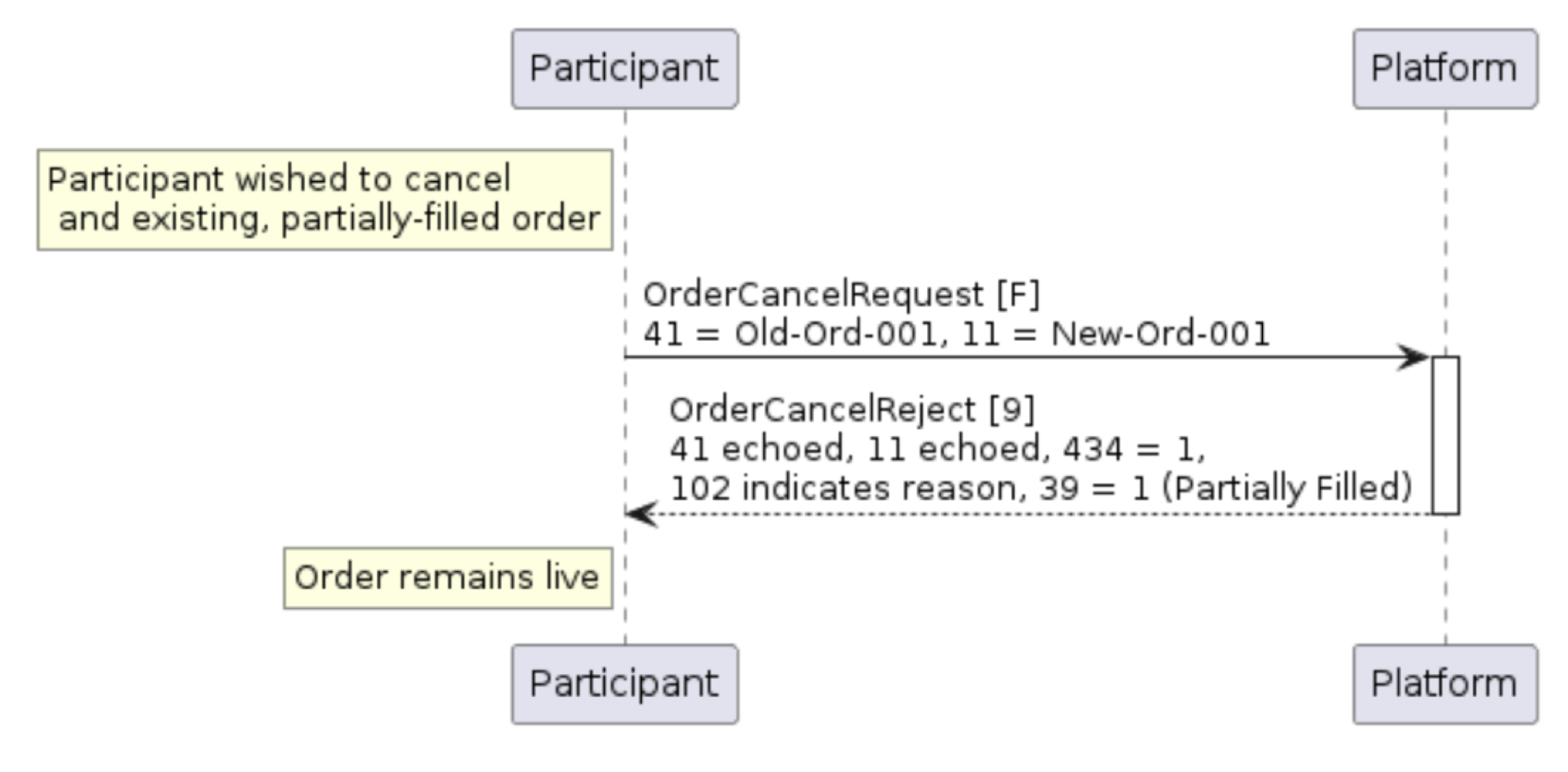
Example 17: Rejection of an unsuccessful cancel attempt